Rate Tracking — My Currency Watch Side Project

I started this project because I missed having the freedom to take an idea all the way from concept to production. When you work for a company, you’re often tasked with someone else’s roadmap, and there isn’t always room for the projects you care about. Building something from scratch is a great exercise — not only to keep up with the latest technologies, but also to sharpen your ability to gather requirements, design user value, and actually ship a working product.
Why this project started
The idea came from a very personal need: I wanted a way to be notified when the exchange rate between my local currency and my home country (Colombia) was favorable — so I could send money home at the best possible time.
Sure, there are plenty of existing tools and services (Google, Yahoo, other finance or wallet apps) that could help. But I wanted something custom and tailored to me — something that could answer the question: “Today — is a good day to send money home?”
I also imposed a few constraints on myself:
- The project should take minimal time,
- it should cost nothing (or almost nothing),
- And the first version (MVP) should be accessible via both web and mobile, in case I ever find other users who might benefit from it.
Short version: Did I succeed?
After months of work, I built the product. You can check it out here: Rate Tracking (Web).
About the cost, it was nearly free. The only expense was the one-time fee for a Google Play Developer account (around 25 USD). The backend (server, database, scheduled workers) was all hosted using free-tier or serverless services. That meant a small database size (suitable only for an MVP) and a minimal server, triggered only when needed. For background jobs, I used GitHub workflows, which remain free within certain limits.
Was it fast to create? Thanks to using a tool like Cursor (my “ally” in building it), the development time dropped significantly — but it still took a few months to reach what I consider an “acceptable” version. This taught me that even a relatively lightweight product needs a fair amount of work to become production-ready. And that’s before you even think about iterating for many users.
What this meant for me — and for a future product
- I got to take a full project from idea → live product. That alone is very rewarding.
- I learned how to design for both web and mobile from the start (which improves future flexibility).
- I validated that you can build a useful service on a shoestring budget and with minimal infrastructure — ideal for an MVP.
- Crucially, I built something that solves a real problem for me. And if I ever find others with the same need (knowing when to send money home), I already have a working base.
Long Version
In this section, I’ll dive deeper into how I built this product. Hopefully, it’s helpful for anyone looking to start creating something from scratch and finally make use of the AI superpowers that many of us overlook.
Ideation
This was my first phase. I began by asking myself two simple questions:
What exactly do I want to build?
What is the minimal version that would solve my problem?
I wrote down the core idea, outlined a basic solution, and then used ChatGPT to refine it. After several iterations, the concept became much clearer, and I had a better sense of what I wanted to achieve.
Preparation
With the idea defined, the next step was to think about the system design — the components required to make everything work.
Being a full-stack engineer helped here. I already knew I’d need at minimum:
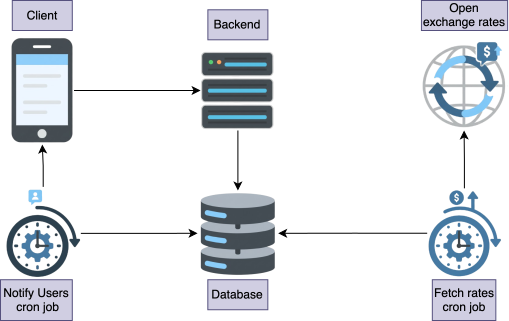
- a backend server
- a frontend
- a scheduled task system (cron jobs) for alerts
- a database
- a free service from which to fetch currency rates
Of course, I also asked ChatGPT for suggestions, and unsurprisingly, the answers aligned pretty closely with what I already had in mind. The final design ended up being:
- A serverless backend
- A React-based frontend
- A server (or runner) for cron jobs
- A relational database
- A public api with a free tier to get the currency rates
Later, I learned that finding a free service that keeps a server running 24/7 for cron jobs is almost impossible — but I’ll come back to this challenge shortly.
Technology Choices
Since I’ve spent many years working with JavaScript, I wanted to keep everything within that ecosystem. I asked ChatGPT for recommendations, and the suggestions matched what I was considering:
Frontend
I chose Expo because it allows you to target web, Android, and iOS from a single codebase — perfect for an MVP.
Backend
ChatGPT recommended NestJS, and it’s a great option for large applications thanks to its structure and separation of concerns. But for something simple, it introduces a lot of boilerplate.
Instead, I opted for Node.js and Express, which enabled me to build quickly with minimal overhead.
Database
I wanted something structured and reliable with fast reads. A relational database, such as PostgreSQL, was the obvious choice.
Cron jobs
For scheduled tasks, plain Node.js scripts were more than enough.
Infrastructure
Initially, I planned to deploy everything on Vercel, but I quickly realized that Vercel is optimized for frontend apps and Next.js APIs. I wanted my backend to be independent and serverless.
After some research — and more ChatGPT queries — I found Render, which offers serverless instances with easy CI integration. It worked perfectly for hosting my backend.
For the frontend, I stayed with Vercel because:
- Their free tier is excellent
- Setting up with GitHub is extremely simple
Vercel also offers a free serverless PostgreSQL option through Neon, which was incredibly easy to configure. The free tier includes 500MB storage and an autoscaling policy from 0.25 CU to 2 CU — more than enough for an MVP.
Having the database and the backend, there was now one key part, from where to get the most latest exchange rates, so I needed was a reliable source for up-to-date currency exchange rates. I did some research — and also checked with ChatGPT for recommendations — which led me to Open Exchange Rates. It’s one of the most consistent and trustworthy providers of exchange rate data, and it offers a free tier with limits that are perfectly reasonable for an MVP.
The tricky part: cron jobs
This was the trickiest challenge. I thought I needed a server running 24/7 so cron jobs could trigger at specific times. Every provider I checked charged for that — even the cheapest options on GCP and AWS.
I was very close to paying.
Then I had another conversation with ChatGPT and realized:
GitHub Actions supports cron schedules — and is free within reasonable limits.
For an MVP running tasks twice a day, GitHub Actions was perfect. Problem solved.
Architecture
With all the core pieces defined, the full system design came together. Here’s how the final architecture looks:
Development
During development, I wanted to avoid spending too much time on boilerplate. Instead, I wanted to focus on product decisions and logic. For this, I used Cursor and later Antigravity to help generate code.
Before generating anything, I set rules for the agents to follow — things that matter to me in a codebase:
- Separation of concerns: each file in its own folder with clear responsibilities
- Unit tests: every generated file should include its own tests
- Reusability: before generating new code, check whether a pattern already exists
- Maintainability: document complex functions; if a function’s complexity exceeds 7, break it down
These rules evolved over time. At first, the AI produced working solutions, but the code was a nightmare to read or modify later. So I refined the rules until the generated code became clean, consistent, and easy to maintain.
That became my biggest principle: the AI should produce code that I can easily understand and improve later.
Deployment
Deployment was straightforward.
Frontend (Expo on Vercel)
I connected the GitHub repo, set the appropriate build commands for an Expo app, and that was it.
Backend (Render)
Render handles deployments automatically through GitHub integration.
Cron jobs (GitHub Actions)
For scheduled tasks, all I needed was a workflow inside .github/workflows/ like this:
name: Release to Google Play

on:
  pull_request:
    types:
      - closed
    branches:
      - main

permissions:
  contents: read

jobs:
  release-android:
    # Run only for merged release PRs
    if: |
      github.event.pull_request.merged == true &&
      (contains(github.event.pull_request.title, 'chore: release') ||
       contains(github.event.pull_request.head.ref, 'release-please'))
    runs-on: ubuntu-latest

    steps:
      - name: Checkout code
        uses: actions/checkout@v4

      - name: Setup Node.js
        uses: actions/setup-node@v4
        with:
          node-version: '18'
          cache: 'npm'

      - name: Install dependencies
        run: npm ci

      - name: Setup EAS CLI
        uses: expo/expo-github-action@v8
        with:
          eas-version: latest
          token: ${{ secrets.EXPO_TOKEN }}

      - name: Build Android App Bundle
        run: eas build --platform android --profile production --non-interactive --wait

      - name: Submit to Google Play
        run: eas submit --platform android --profile production --non-interactive --latest
        env:
          EXPO_TOKEN: ${{ secrets.EXPO_TOKEN }}
Android Deployment
I haven’t built the iOS version yet while writing this, so I focused exclusively on Android.
You’ll need a Google Play Developer account, which now costs a one-time $25 USD fee. Ten years ago, it was free — but the fee likely helps improve store quality.
Once you create your account, there’s a long onboarding process where you must provide personal (or company) information. After that, you can finally create your app project.
But that’s not enough to publish your app…
You must pass through several testing phases first:
- Internal testing
- Closed testing
- Open testing
- Complete 12 tests over 14 days in closed testing
- Final Google review
Only after all that can your app go live.
- Open from web → https://play.google.com/apps/testing/com.ratetracking.app
Automating Android Releases
To automate deployments, I used EAS CLI, which Expo recommends.
Once configured, I created a GitHub Action that builds and uploads the app automatically anytime a release PR is merged:
name: Release to Google Play

on:
pull_request:
types:
- closed
branches:
- main

permissions:
contents: read

jobs:
release-android:
# Run only for merged release PRs
if: |
github.event.pull_request.merged == true &&
(contains(github.event.pull_request.title, 'chore: release') ||
contains(github.event.pull_request.head.ref, 'release-please'))
runs-on: ubuntu-latest

steps:
- name: Checkout code
uses: actions/checkout@v4

- name: Setup Node.js
uses: actions/setup-node@v4
with:
node-version: '18'
cache: 'npm'

- name: Install dependencies
run: npm ci

- name: Setup EAS CLI
uses: expo/expo-github-action@v8
with:
eas-version: latest
token: ${{ secrets.EXPO_TOKEN }}

- name: Build Android App Bundle
run: eas build --platform android --profile production --non-interactive --wait

- name: Submit to Google Play
run: eas submit --platform android --profile production --non-interactive --latest
env:
EXPO_TOKEN: ${{ secrets.EXPO_TOKEN }}
Learnings
Thank you for reading to the end. Here are some key takeaways from building this project that I wanted to share with you:
- Just build it — the tools exist! If you have an idea, there’s really no limit to what you can create these days. Thanks to AI agents and modern platforms, getting a concept into production is often faster and easier than ever before.
- You only need the internet, a laptop, and some time. Tons of services and resources help make your idea real and accessible to users — you don’t need a full dev team or massive budget. If you can carve out 1–2 hours a day to work on side projects, you’ll be amazed at what you can learn and build. Even if your project never gets used by the “final users,” the skills and insights you gain while building it are priceless.
- Define the value first — then build. One thing I wish I had done better was spending more time defining the objective and thinking clearly about the core value for users before diving in. Focusing first on the minimum viable product (MVP) — the smallest set of features that delivers real user value — would have helped me avoid scope creep and wasted effort. The concept of an MVP is all about testing assumptions fast and getting feedback from real users rather than building everything at once.
- Aesthetics over functionality? Not always worth it. I spent a lot of time polishing the UI and making the app look pretty when I could have spent that energy making it functional and user-validated first. Design definitely matters, but when you’re building a first version, function should come before form — at least enough so users can experience the core value.
- AI tools can help with UI & design. I later discovered tools like Google Stitch — an AI-powered UI generator that lets you create polished interface designs from text prompts or sketches, and even export frontend code or Figma layouts. It’s free and browser-based, so it’s great for rapid prototyping and UI exploration without hand-crafting every detail yourself.
- Pick design systems wisely. I also leaned too heavily on building a custom UI using just TailwindCSS, which meant I spent time designing my own components rather than shipping features that users could test and interact with. For future projects, I’d recommend starting with an existing design system (e.g., Material UI, Shadcn, Radix UI, etc.) to cut down on custom work and focus on what matters most.